Business Ops Addon
Business Ops
Invoicing, online payments, contract rate schedules, bids, deployment billing, Cal OES mutual-aid cost recovery and real margin, all against the contacts, crews and time reports your department already keeps in Resgrid. Contacts, certifications and deployments stay free; this is what turns them into money.
INV #2026-00142

  Customer   Sierra Timber Co.
  Source     Deployment, DTR 0087-0089
  Terms      Net 30, 10% contract discount

  Tue        Type II 8-person, 14 h
             8 h crew, 4 h OT 1.5, 2 h OT 2
  Wed        Type II 4-person, 10 h
  Mileage    310 km, 60 billable

  Status     Sent, Pay online link
  Margin     Estimated 31%
What Every Department Already Gets
The operational record is free. Every Resgrid department, on every plan, can keep its customers and sites, prove who is qualified, and document a deployment down to the signed daily time report at no additional cost. Business Ops is what turns that record into an invoice, a payment, a reimbursement and a margin.
Contacts, Sites and Pre-Plans
People and organizations with service locations, NFPA 1620 pre-plans, hazards, access notes, alert notes and site files that surface on the call at dispatch and in the field apps.
Certifications and Role Qualification
A typed certification catalog for people and Units, role and Unit requirements, expiry notifications, graduated enforcement and the qualification snapshot preserved for every assignment.
Deployments, Time and Expenses
The deployment wrapper on a Call: roster and seat wizard, pre-numbered daily time reports with breaks and mileage, expenses with receipts, manifests, equipment issuance and the link to a mutual-aid resource order.
Where the free record stops
A signed daily time report tells you an 8-person Type II crew worked fourteen hours on Tuesday and drove 310 kilometers. It does not know that the contract pays 8 hours at the crew rate, 4 at time-and-a-half and 2 at double, that the crew bills at the 4-person rate on Wednesday because four of the eight seats were empty, that the first 250 kilometers are free, that the customer gets 10 percent off, or that GST and PST print as separate lines with your registration numbers. It also does not know whether you made money. That is the gap where billing turns back into a spreadsheet and a bookkeeper's weekend. Business Ops closes it, against the same Contact, Call, crew and time report the work was recorded on.
Know the customer
Included with every plan
Contacts, organizations, sites, pre-plans, hazards and attachments
Covers: Who you serve, and what is on site
Send qualified people
Included with every plan
Typed certifications, role and Unit requirements, expiry and enforcement
Covers: Who is allowed to fill the seat
Record the work
Included with every plan
Deployment roster, daily time reports, expenses, mileage, manifests, equipment
Covers: What actually happened, signed in the field
Turn it into money
Business Ops addon
Invoices, online payments, rate schedules, bids, contracts, MARS recovery, cost and margin
Covers: Getting paid, recovering cost, knowing the margin
Adding Business Ops does not change the three stages above it. Your contacts, certifications, deployments and time reports stay exactly as they are and gain a billing, recovery and costing lifecycle on the end.
What the Addon Adds on Top
Customer invoicing, online payment collection, contract-grade deployment billing, Cal OES cost recovery, and a protected costing model that tells you the margin.
Invoices Generated From Calls
Add a closed call to an invoice and the line items come from the unit state history you already have: time on scene against a rate card, flat per-call fees, mileage and materials, with rounding and minimums applied. Lines stay editable before anything is sent.
Paid Online, Into Your Own Stripe Account
Connect your department's Stripe account with Stripe's own authorization flow and every invoice can carry a Pay online link. Money settles in your balance, Resgrid records the payment from Stripe's signed webhook, and there is no Resgrid fee on top.
Contract Rate Schedules That Match the Paper
Standby and deployment hourly rates, overtime bands with contract-specific thresholds, crew rates keyed to crew type and filled seats, stacking premiums, daily equipment tiers, out-of-province days, mileage allowances and per diems, stored as explicit dollars, never as a formula.
Bid to Deployment to Invoice
Price a bid from the schedule, accept it, and the wizard schedules the Call and Deployment with a qualified crew. Approved daily time reports then generate one invoice line per billing day with the DTR, incident and resource-order numbers on it.
Cal OES MARS Cost Recovery
Agency, rate and agreement readiness, F-42 and expense packets prefilled from the deployment's own roster and time facts, an expected reimbursement figure, and reconciliation of the invoice Cal OES generates. Prepared for the portal, never scraped into it.
Real Margin, Protected Pay Data
Loaded labor and apparatus cost frozen against a bid, deployment or call, compared with what you invoiced or expect to recover. Compensation and California Pay Data Reporting live behind Advanced Data Protection, never on a roster.
One Deployment, From Bid to Bank
The crew size a supervisor confirmed on the seat grid, the hours a crew leader signed on the daily time report and the kilometers on the truck are the facts on the invoice. Nothing is re-keyed between these steps.
1
A customer is set up
The Contact your dispatchers already use gains a billing profile: terms, tax identity, PO rules and a default discount.
Business Ops
2
A bid becomes a deployment
The bid is priced from the contract schedule. Accepting it schedules the Call and Deployment and seats a qualified crew.
Business Ops
3
The work is signed in the field
Daily time reports, breaks, mileage, expenses and equipment are captured in the apps and approved by a supervisor.
Included free
4
The invoice writes itself
One line per billing day with bands, crew size, premiums, mileage and discount applied, documents attached, sent with a Pay online link.
Business Ops
5
You know what it cost
The payment lands from Stripe's webhook, aging updates, and loaded cost beside revenue shows the margin.
Business Ops
Invoices Built From What Actually Happened
A billing profile on the Contact sets terms, tax identity, purchase-order rules and a default discount. A rate card prices the work. When you add a dispatched call to an invoice, the draft lines are generated from unit state history and the card, so nobody re-keys times out of the CAD screen into accounting. Sequential numbering, PDF rendering, e-mail delivery, manual and online payments, partial balances, aging and automatic overdue status are all part of the same record.
- Per-contact billing profiles with terms, tax identity, PO requirement and default discount
- Rate cards for hourly Unit, hourly personnel, flat per-call, fixed fee, mileage and material lines
- Draft lines generated from time on scene, with rounding and minimums, then editable
- Contact-level discounts that cascade to contracts, bids and invoices
- Named multi-component taxes (GST + PST, HST) printed with registration numbers
- Sequential invoice numbers, PDF and e-mail delivery, A/R aging by bucket
- Draft, Sent, Partially Paid, Paid, Overdue and Void, with Workflow triggers on each
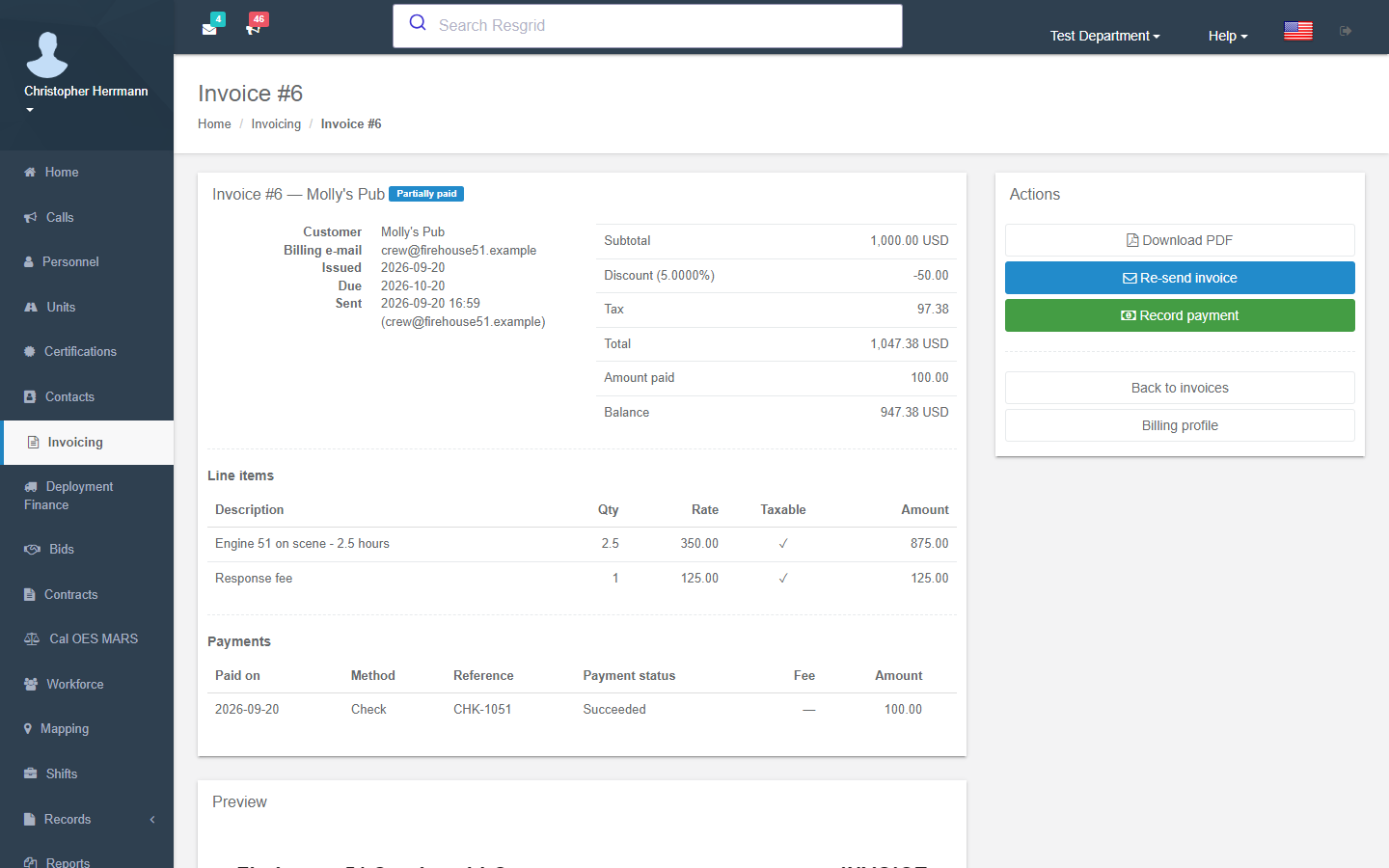
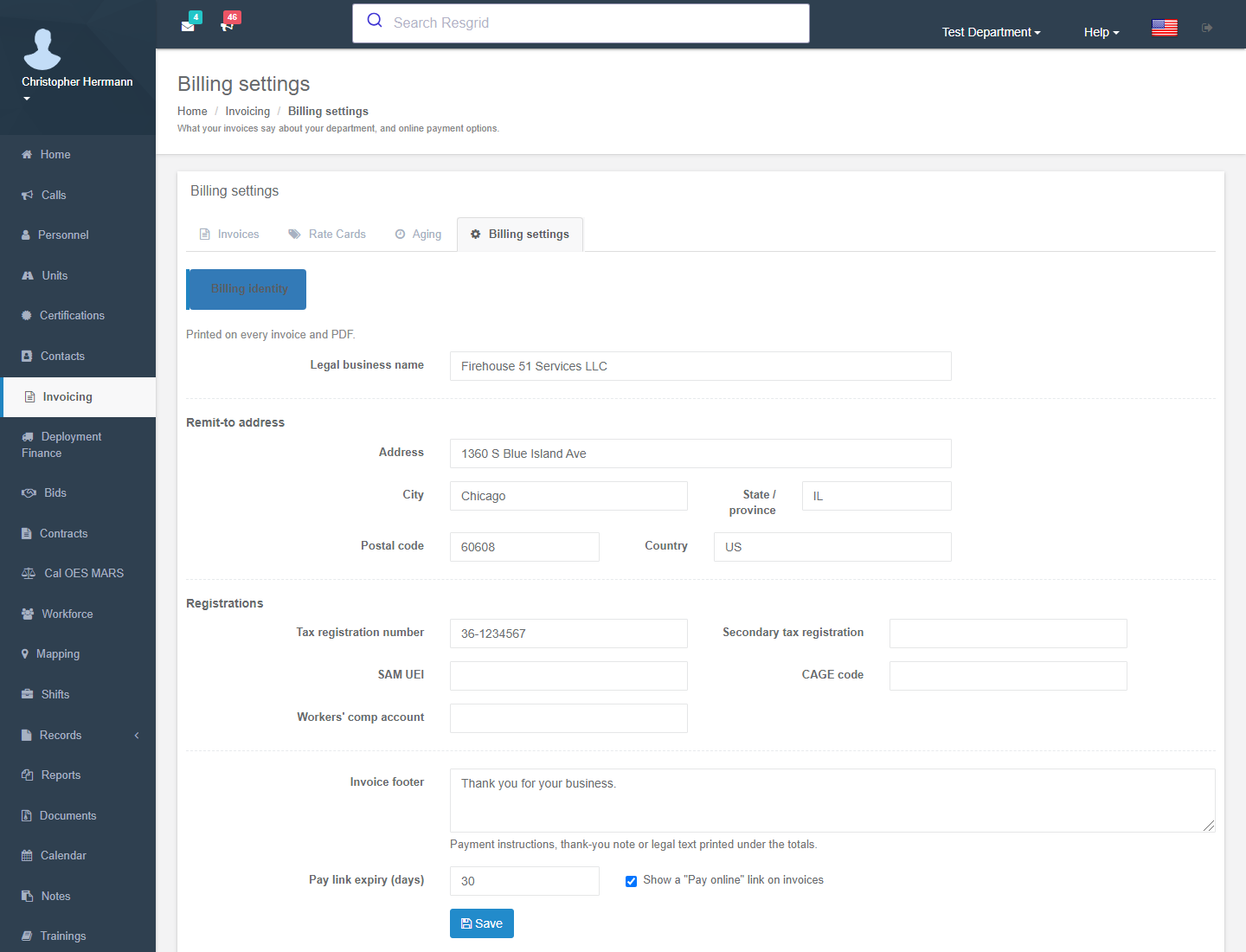
Get Paid Into Your Own Stripe Account
Online payments run through the department's own Stripe account, connected with Stripe Connect OAuth rather than a pasted secret key. The customer pays on Stripe's hosted checkout page, funds settle to your balance, and Resgrid records the payment when Stripe's signed webhook arrives. Resgrid is not the merchant of record: it holds no funds, sees no card numbers, adds no fee, and cannot refund. Refunds and disputes you handle in Stripe are mirrored back onto the invoice.
- Connect with Stripe from Invoicing settings; disconnect any time
- Pay online link on the invoice PDF and e-mail, with an expiry you set
- Hosted checkout only, so card data never touches Resgrid
- Payment truth comes from the verified webhook, never a return URL
- Refunds and disputes re-open the balance and fire their own Workflow triggers
- Available in US-West at launch; not yet offered in EU Central
Contract Rates That Match the Paper
Contractor agreements do not follow clean formulas. An 8-person crew is not twice a 4-person crew, overtime premiums are flat adders rather than multipliers, and the overtime boundary moves from contract to contract. Business Ops stores every band as an explicit amount on a versioned rate schedule, resolves the crew size from the seats actually filled on each day, and keeps the contract's rounding, cancellation, guarantee and stand-down policies with the schedule.
- Standby, deployment, overtime 1.5x and 2x bands with per-contract thresholds
- Personnel rates by certification level; crew rates by type and filled seats
- Stacking hourly premiums with their own standby and overtime adders
- Daily equipment and vehicle rates, tiered by hours worked that day
- Mileage beyond a daily allowance, per diems, private accommodation, out-of-province days
- Contracts with document requirements, and department compliance documents with expiry alerts
- Bids priced from the schedule, sent as PDF, accepted into a scheduled deployment
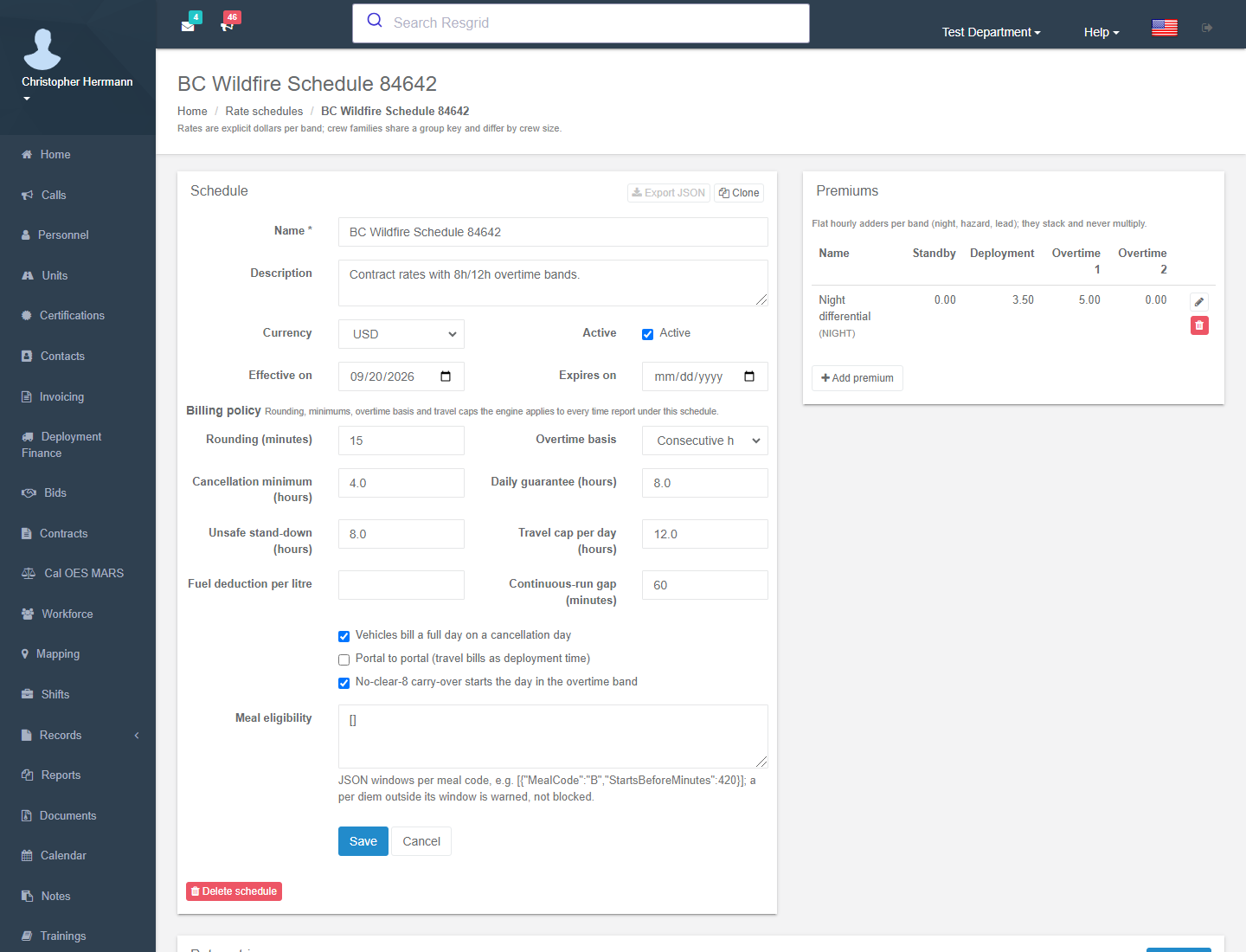
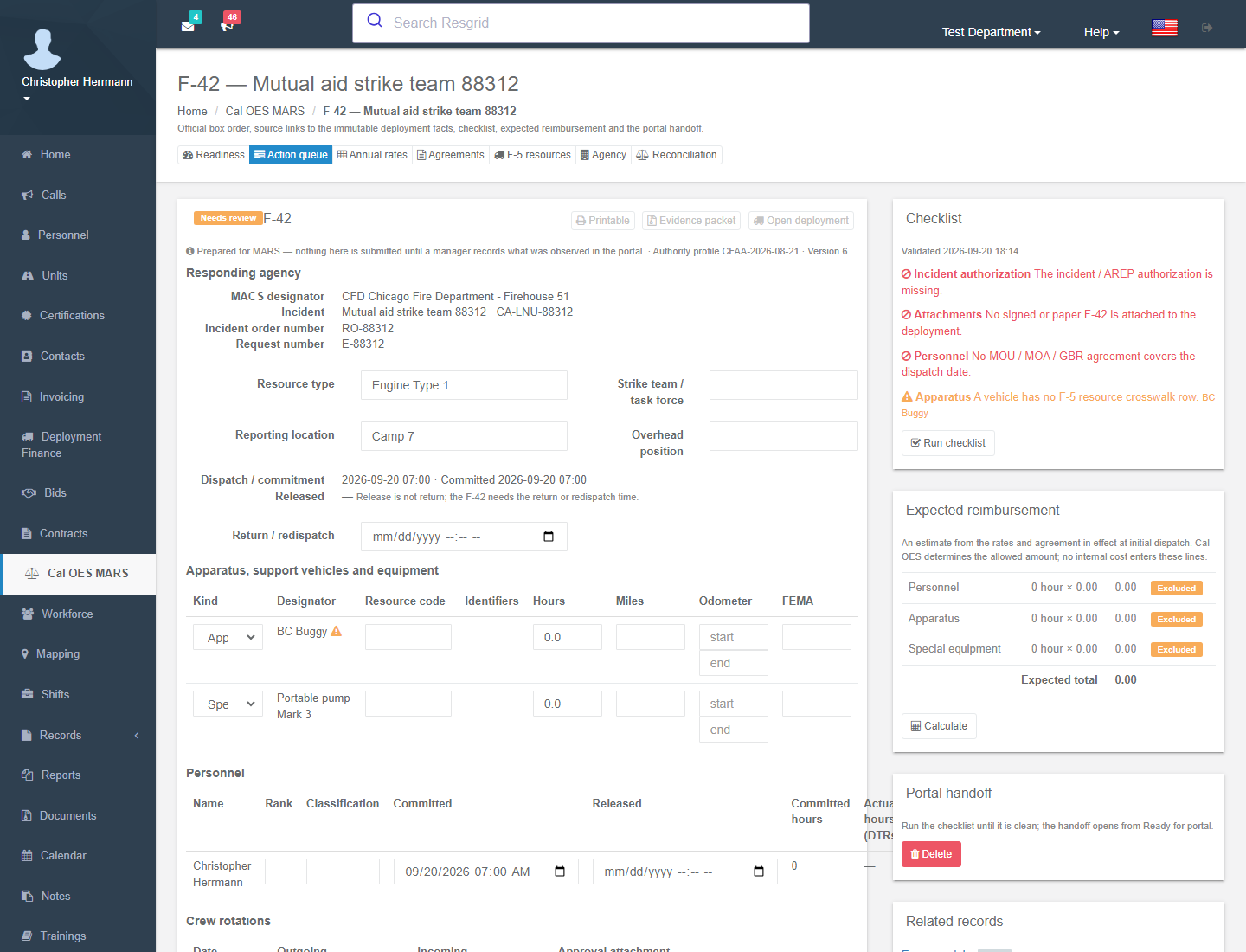
Cost Recovery and a Margin You Can Defend
For California mutual aid, Business Ops pins the agency, rate and agreement profile in effect at dispatch, projects the F-42 and expense claim from the deployment's own order, roster, apparatus and time facts, validates the packet, and calculates the expected reimbursable amount. You hand the packet to the Cal OES portal and record what MARS says back. With Workforce costing enabled, loaded labor and resource cost sit beside that recovery, or beside a customer invoice, as an estimated contribution margin with every missing input listed.
- Readiness dashboard for agency identity, F-5 inventory crosswalk, rates and agreements
- F-42 and expense work items prefilled and validated against the official field order
- Expected reimbursement per line, reconciled against the MARS-generated invoice and payment
- Loaded labor from effective-dated pay, employer burden and allocated overhead
- Apparatus and equipment cost from depreciation, fuel, maintenance, tires and insurance
- Estimate versus actual snapshots that later rate changes never rewrite
- California Pay Data Reporting export against a pinned CRD profile, with preflight exceptions
What it replaces
One Addon Instead of a Stack of Subscriptions
Departments that bill for their work usually end up with five or six tools that each keep their own copy of the customer, the job and the worker, plus the staff time to reconcile them. This is the stack Business Ops is designed to replace, with typical published prices for each category.
Need | Stitched together today | Typical cost | With Business Ops |
|---|---|---|---|
Customer invoicing and A/R | An invoicing app or accounting add-on, with someone re-keying call times from the CAD screen | $50 to $400 / mo | Lines generated from unit state history and a rate card; PDF, e-mail, payments and aging built in |
Online payment collection | The invoicing platform's payment rail, with its own percentage on top of card processing | 0.4% to 1%+ per paid invoice | Your own Stripe account, hosted checkout, 0% Resgrid fee |
Quotes and bids | Proposal and e-signature seats, priced per user | $20 to $50 / user / mo | Bids priced from the contract rate schedule, sent as PDF, accepted straight into a deployment |
Contracts and compliance documents | A contract-management tool, or a calendar reminder for the COI renewal | $100 to $400 / mo | Contracts with document requirements; COI, WCB and SAM/UEI expiry warnings at bid and invoice time |
Contractor deployment billing | One spreadsheet per contract and a bookkeeper working through paper DTRs | 4 to 8 hours per deployment | Approved DTRs generate one line per billing day with bands, crew size, premiums, mileage and per diems |
Job costing and margin | The accounting package's job-costing tier, or a consultant at budget time | $100 to $250 / mo | Loaded labor and equipment cost frozen per bid, deployment or call; estimate versus actual |
Cal OES MARS preparation | F-42s and expense claims assembled by hand, or a cost-recovery consultant paid per claim | 2 to 4 hours per F-42, or a share of recovery | Packets prefilled from the deployment record, validated, with expected reimbursement and reconciliation |
California Pay Data Reporting | A payroll-vendor report add-on or an HR consultant every spring | $500 to $2,500 / yr | CRD-profile export with a preflight exception report, behind Advanced Data Protection |
Typical stitched-together stack, before any staff time | $350 to $1,400 / mo | $250 / mo, per department, everything above | |
Cost ranges are rounded from publicly listed prices for the tool categories named, as of September 2026, and vary by vendor, seat count and plan; they are not quotes for any specific product. Hours are Resgrid's estimates for a department doing the work by hand. Use the calculator below with your own numbers.
Where the hours go
Time Your Office Gets Back
Most of the cost of billing is not the software. It is the person re-keying what the field already recorded. These are the tasks Business Ops removes or shortens, with the before and after our estimates are based on.
Each customer invoice
By hand
40 min
Business Ops
10 min
Saved
30 min
Pull times from the call, apply the rate card, key it into accounting, attach, e-mail, file the copy, versus add the call, review the generated lines, send.
Each multi-day deployment invoice
By hand
6 h
Business Ops
1 h
Saved
5 h
Transcribing paper DTRs, working out overtime bands, crew sizes and premiums per day, totaling mileage and per diems, assembling the supporting-document packet.
Each Cal OES F-42 packet
By hand
3 h
Business Ops
1 h
Saved
2 h
Re-entering resource, order, request, roster, apparatus and commitment facts into the form and checking them against the agreement, versus reviewing a prefilled, validated packet.
Month-end A/R and follow-up
By hand
3 h
Business Ops
30 min
Saved
2.5 h
Building the aging report and chasing overdue invoices by hand, versus an aging view that is always current and an overdue Workflow that sends the reminder for you.
Qualification check before billing at a certification rate
By hand
15 min / person
Business Ops
0
Saved
15 min / person
Confirming every crew member's certification against the contract minimum before the invoice goes out, versus a seat grid that showed typed certification status when the crew was assigned.
Annual California pay-data report
By hand
30 h
Business Ops
8 h
Saved
22 h
Assembling the employee snapshot, establishment groups, pay bands and demographic aggregates in a spreadsheet, versus reconciling imported facts and exporting against the pinned CRD profile.
Run your own numbers
What Business Ops Is Worth to Your Department
Start from a department that sends 40 invoices a month, runs six contract deployments a year and pays a billing clerk $35 an hour loaded, then change the inputs to match yours. The per-task savings behind the math are the ones shown above.
Month-end aging and overdue follow-up is counted at 2.5 hours saved per month for every department.
Estimated net savings, first year
$11,100
after the $3,000 a year Business Ops costs your department
300 h
staff hours back per year, about 7.5 working weeks
$14,100
gross savings: $10,500 staff time plus $3,600 subscriptions
2.6 mo
until the addon has paid for itself
Customer invoices
240 h a year, $8,400
Deployment invoice packets
30 h a year, $1,050
Cal OES F-42 and expense packets
0 h a year, $0
Month-end aging and follow-up
30 h a year, $1,050
This is an estimate built from the assumptions above and your inputs, not a guarantee. It leaves out the things that are harder to put a number on: the invoice that goes out three weeks sooner, the reimbursement claim that is not returned for correction, the crew member billed at a rate their certification did not support, and the bid you can now price knowing what it will cost.
Compared to Accounting Software and Spreadsheets
Business Ops is not an ERP. It is for departments and response contractors that need to bill for dispatched work, price contract deployments correctly, recover mutual-aid cost and know their margin, without a second customer list, a second login and a bookkeeper translating between them.
| Accounting software plus spreadsheets | Resgrid Business Ops |
|---|---|---|
Where the customer lives | In the CRM, in accounting, and again in the dispatch system | One Contact, from the pre-plan at dispatch to the invoice and the payment |
Where invoice lines come from | Someone reads the call and types times into accounting | Generated from unit state history and the rate card, then reviewed |
Contract rate tables | A spreadsheet per contract that only the bookkeeper understands | Versioned schedules with explicit bands, crew sizes, premiums and policies |
Getting paid online | The platform's payment rail, its fee, and its idea of when you were paid | Your Stripe account, hosted checkout, 0% Resgrid fee, webhook-verified |
Mutual-aid reimbursement | F-42s rebuilt from memory weeks later, then returned for correction | Prefilled from the deployment record, validated, reconciled against MARS |
Knowing the margin | Reconstructed at year end from invoices and payroll exports | Loaded cost frozen beside revenue on every bid, deployment and call |
Who can see pay | Whoever has the spreadsheet | Dedicated permissions, MFA step-up, value-free audit, never on a roster |
Business Ops Pricing
Business Ops is a per-department addon billed monthly, even if your department is on an annual plan. It is priced per department rather than per invoice, per user, per crew or per deployment, so a contractor running ten crews pays the same as a department that bills a dozen calls a month. Adding or removing it does not change your main subscription or your entity count.
US-West (Worldwide)
$250 /mo
per department, billed monthly
Includes online payment collection through your own Stripe account
EU Central (EU)
€295 /mo
per department, billed monthly
Online payment collection is not yet offered in EU Central
Contacts, certifications and deployment capture are free and do not require Business Ops. Workforce pay data additionally requires the Advanced Data Protection addon. The annual-plan discount applies to your subscription, not to addons.
What Business Ops Does Not Do
A billing module is only worth buying if you know where it ends. These are the deliberate boundaries.
Contacts, certifications and deployments do not require it
Pre-plans, the certification catalog with role and Unit enforcement, and the deployment core with rosters, daily time reports, expenses and manifests are core platform capabilities at no additional cost. Business Ops is the money layer that sits on top of them, not a paywall around them.
It is invoicing and costing, not accounting
Business Ops produces invoices, payments, aging, cost runs and reimbursement packets. It is not a general ledger, tax filing, bank reconciliation or double-entry accounting system. Use Workflows and the API to hand invoices and payments to the accounting package you already keep.
Payroll facts in, payroll processing out
Workforce costing stores effective-dated pay terms, employer burden and annual W-2 facts for costing and California reporting. It does not calculate withholding, net pay, leave balances, overtime legality or W-2s, and it never transmits payroll.
Resgrid never holds your money
Online payments settle in your own Stripe account. Resgrid is not the merchant of record, adds no fee, cannot refund and never sees card data. Refunds and disputes start in your Stripe dashboard and are mirrored back. You pay only Stripe's own processing fees.
MARS is prepared, never automated
Cal OES MARS has no public API. Resgrid prepares, validates, links evidence, calculates expected recovery and records the statuses you observe. It stores no portal credentials, performs no screen scraping, and never claims to have submitted anything on your behalf.
Some of it is regional
Cal OES MARS and Pay Data Reporting are California-specific. Multi-component taxes cover Canadian GST, PST and HST. Online payment collection is available in US-West at launch and is not yet offered in EU Central; every other capability is available in both regions.
Pay data needs Advanced Data Protection
Compensation, demographic and annual reporting facts are only stored under Advanced Data Protection, with dedicated permissions, a fresh MFA grant for values and exports, and value-free audit. There is no plaintext fallback.
It is billed per department, monthly
Business Ops is billed monthly per department even if your main subscription is annual, and the annual-plan discount does not apply to addons. It is not priced per invoice, per user, per crew or per deployment, and it does not change your plan or your entity count.
If it lapses, nothing disappears
Existing invoices, bids, contracts, deployments, cost runs and MARS work items stay readable and their PDFs still download. No new invoice, bid, charge calculation, cost run, export or portal handoff is generated until the addon is renewed.
Business Ops is the paid billing, cost-recovery and costing layer of Resgrid Workforce & Business Operations. See the full Workforce & Business Operations module for the complete contact, certification and deployment model it builds on.
Wired Into the Rest of Resgrid
Invoices, bids, deployments and cost runs reference the Contacts, Calls, personnel, Units, certifications and inventory you already dispatch, and the results feed Workflows, Records, Advanced Data Protection and your own Stripe account.
Contacts & Pre-Plans
Dispatch & Calls
Personnel & Units
Certifications
Responder & Unit Apps
Inventory
Records / RMS
Workflows
Advanced Data Protection
Your Stripe Account
Stop Re-Keying the Work Your Crews Already Recorded
Add Business Ops to your plan and every dispatched call, contract deployment and mutual-aid assignment ends in an invoice, a payment, a reimbursement packet and a margin you can defend.
0%
Resgrid Fee on Online Payments
Per Dept
Not Per Invoice, User or Crew
1 Line / Day
Contract-Compliant Deployment Invoices
Free
Contacts, Certifications, Deployments